Enterprise Browsers Sit Alongside Operating Systems In the Modern Workplace
With a staggering increase in cyber breaches in recent years—including an astonishing 10-fold rise in serious cyberattacks against European Union institutions between 2018 and 2021, building a secure environment for conducting business has never been more important.
Alarming hikes in ransomware and phishing attacks are heaping pressure on enterprises to tighten up controls and secure their employees’ browsers, which are becoming an essential modern work tool.
“The daily workload of business operations in the browser has increased dramatically in recent years,” says Jochen Eisinger, Director of Engineering for Chrome Trust and Safety at Google. “By 2030, the browser is on course to become the new operating system for enterprises.”
As companies transition to cloud services, many employees will spend most of their working day on a browser, which is a critical endpoint for cybersecurity.

“Security leaders today cannot afford to continue without having a robust browser security strategy,” says Eisinger. All enterprises should follow the simple first steps to browser security: switching on the free, in-browser security settings and downloading the latest version with updated security fixes. But many enterprises fail to take even these basic steps, leaving their networks exposed to attack.
Businesses using Chrome Enterprise can activate some of the browser’s security controls at no extra cost and centrally manage browsers across the organization with Chrome’s cloud-based management tool.
The human face of cybersecurity
With cyberattacks against businesses soaring, it is worth remembering that most enterprise data breaches involve human error. Users are typically tricked into revealing confidential information or downloading malicious files through “social engineering” attacks, which deceive users into believing they are clicking on valid links or opening files sent from contacts, but instead download malware. Staff must be constantly vigilant about these dangers. Browsers play a critical role in thwarting social engineering attacks, alerting users to potentially dangerous communications and advising them to beware of fraudulent activity. For instance, Chrome Enterprise is designed with a variety of built-in security features including URL filtering, which allows enterprises to block employees from accessing certain websites. The browser also offers protections against malicious extensions and has a safe browsing mode, which shows a warning if users are about to visit a dangerous site or download a harmful app.
Meanwhile, the rise of artificial intelligence is sharpening the tools available to cyberattackers. These include deepfakes, where attackers can mimic a user’s identity to access bank accounts and confidential data. The development of superfast computers based on quantum technology is likely to further increase threat levels.
Some 74% of data breaches analyzed in Verizon’s 2023 Data Breach Investigations Report included a human element. In 2021, 92% of malware—software typically used for cyberattacks—was delivered through deceptive emails, where users were tricked into downloading malicious files, according to the Trend Micro 2021 Annual Cybersecurity Report, which notes that phishing emails were responsible for 90% of 2021’s data breaches.

Hybrid working puts cybersecurity teams on red alert
Enterprise security is further threatened by the massive growth of hybrid working since the pandemic. With employees working on browsers not just in the office, but at home, in a library or in a coffee shop, and many staff using their own devices for work, the opportunities for attackers to target enterprises have greatly expanded. Information security staff are accustomed to securing networks in the workplace, but it is harder to exert tight control over personal devices on remote networks.
Remote workers are susceptible to cyberattacks from a variety of sources, whether they are accessing shared Wi-Fi networks in public spaces or bypassing network security systems outside the office environment. Enterprises are turning to browsers with centralized management systems that can set accessibility and privacy policies across a fleet of devices in any location from a single point of control.

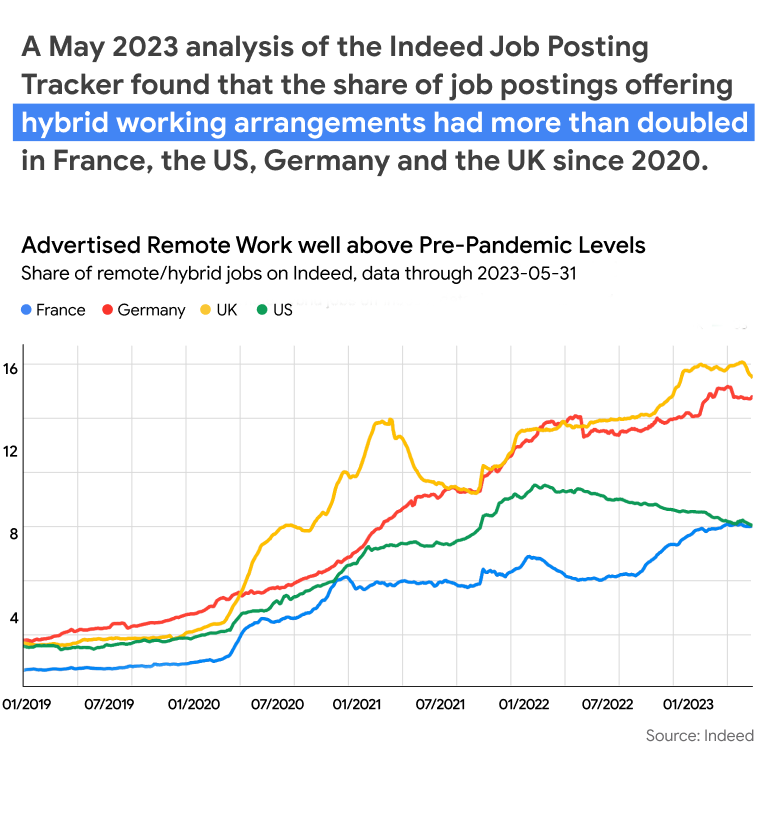
Line graph of “Advertised Remote Work Well Above Pre-Pandemic Levels,” showing the share of remote/hybrid jobs on Indeed for France, Germany, the UK and the US.
Cybersecurity by design
Designing a secure enterprise browser strategy is vital for today’s enterprises. First and foremost, a browser used across the enterprise must be compatible with the devices and user profiles of everyone in the organization. The browser should be capable of working with both modern cloud-based solutions as well as legacy cloud software, and with software running on the enterprise’s own servers.
Enterprises should ensure that their browser provider has a proven track record in managing breaches and can provide evidence that they have deep security knowledge. Does the security team react quickly to problems, and has the browser been designed with security in mind?
Eisinger says that an example of security by design is Chrome’s site isolation function, which allows individual websites and web applications to run as independent processes, safeguarding them from contamination by compromised sites.
He adds that Google, which ships Chrome, has developed a high level of expertise in cybersecurity and deploys multiple initiatives to combat cyber risks. These include Google’s Vulnerability Rewards Program (VRP) that offers bug bounties to security researchers who find vulnerabilities in Google’s products and services. Businesses are advised to check that the browser provider is up to date with security standards and emerging threats. Post-quantum cryptography—creating secure systems now which can resist yet-to-be-invited future computers—is an emerging challenge today, and it is essential that the browser vendor is adequately prepared for future threats and is actively involved in security research. Chrome continues to build its security resilience, and it already uses encryption to help protect against cyberattacks.
2023 is on course to be the worst year ever for zero-day exploits, and is set to overtake the pandemic high reached in 2021.

Managing zero-day attacks
Bugs that are exploited by attackers before they’re known to the software maker are known as “zero-day” vulnerabilities—since you have zero days to fix them. All software is vulnerable to these attacks, including browsers. It is essential to evaluate whether the browser provider is transparent about zero-day vulnerabilities, and if they have a strong track record of taking swift action against zero-day threats.
Enterprises should check whether the browser provider has a track record of responding quickly and transparently when learning of a vulnerability. Google’s security analysts on its Threat Analysis Group (TAG) and Project Zero team are tasked with finding zero-day vulnerabilities, and Chrome releases zero-day fixes faster than other Chromium-based browsers.
Online data loss is a growing threat
Online data loss is another serious threat to enterprise security. Business employees upload huge amounts of data to the web every day as they access online tools and work in the cloud. Staff can inadvertently—or even intentionally—upload confidential data, or it can be stolen by malicious actors. This can tarnish a company’s reputation, which takes a hit when data breaches occur. Data loss prevention (DLP) is a vital role for browser security. An effective browser system can set policies to control the types of data that can be uploaded to different sites—for instance, by preventing copying and pasting of certain content.
The arrival of generative AI and general-purpose conversational chatbots has led to a huge boost in enterprise productivity and made many tasks much easier. Security teams must prevent the sharing of confidential data while still letting employees take advantage of generative AI. This can be achieved by setting up DLP rules in generative AI systems.
Code42’s 2023 Annual Data Exposure Report reveals an average 32% year-over-year increase in data losses from insider incidents, costing each organization an average of $16 million per incident. Insider incidents include data exposure, losses, leaks and thefts originating internally from an organization employee.
More than 82% of chief information and security officers (CISOs) admit to being concerned about insider risk within their organizations and the data loss associated with it.
Google’s zero-trust solution, BeyondCorp Enterprise, offers enterprises a zero-trust framework, offering secure access to applications and resources, and data and threat protection.

Trusted access
A critical new tool in modern cybersecurity is the zero-trust framework. Every user, whether inside the organization’s network or outside, must be authenticated and their identity must be continuously validated.
“A traditional security model relies on machines that are physically located in the office being trusted to access data,” explains Eisinger. “A zero-trust framework, by contrast, ignores a device’s physical location or network connection, but checks the conditions when users access the network: Is the user signed in? Are the operating system and secure browser up to date? Is there a screen lock, so a passerby can’t easily access the machine? There is zero pre-given trust.”
Message to the board
An enterprise’s chief information officer should work closely with the chief information security officer to persuade the C-suite that cybersecurity must be built into the tech stack by design, rather than added as an afterthought. Browser security is a critical part of this effort.
The CIO and CISO should regularly update the board on the frequency and type of cyber incidents, including the number of zero-day attacks that have been thwarted. Stressing the vulnerability of all businesses to cyberattacks, the pair should push for the adoption of zero-trust networks across the enterprise and promote cyber hygiene among the workforce.
Managing the security of an enterprise’s browser and fleet of devices is the first line of defense against attacks.

Effective cybersecurity requires several layers
“There’s no silver bullet for cybersecurity,” says Michael Suby, Research Vice President in the Security and Trust team at technology research company IDC. Every enterprise requires a variety of locks on the front door of their network and requires several layers of security. Browser security is an essential part of the mix, he says, given the centrality of browsers in the modern work environment.
Using browser security controls saves enterprises from the disruption of implementing new software, he says, though he warns that IT teams must strike a balance to ensure that security controls don’t interfere with work productivity.
“Many security practitioners are struggling with doing the right thing from a cybersecurity standpoint, and balancing this against business risk and disrupting critical business operations,” says Suby.
A browser security strategy must bolster protections against cyberattacks and data loss without interfering with the everyday user experience of employees. If IT security teams get this balance wrong, staff may look for ways around burdensome security controls so they can work faster, such as downloading alternative, less secure browsers on their own devices.
Forget complexity. Embrace security.
Getting started with browser security is simple. The first step is to ensure that your organization is using a browser designed with security in mind.
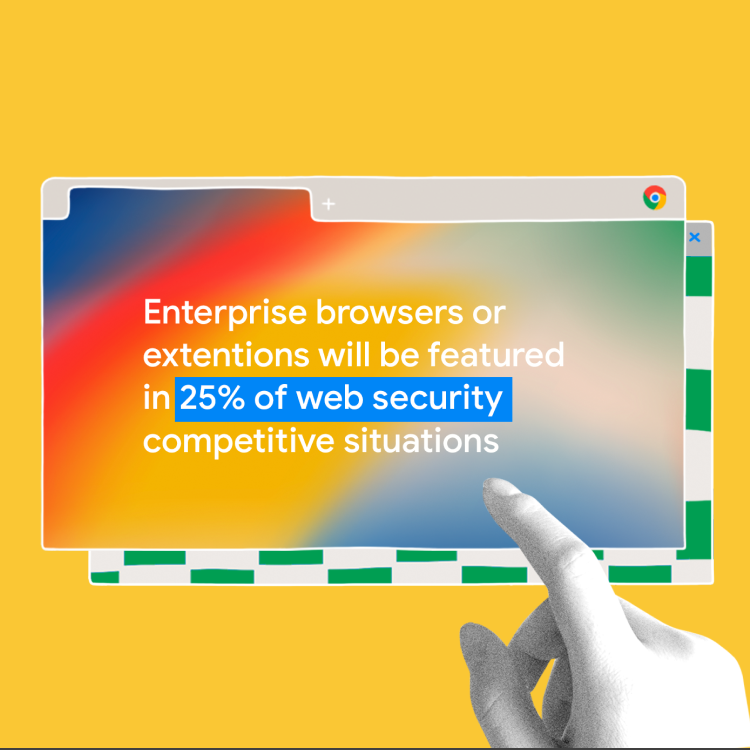
“By 2025, enterprise browsers or extensions will be featured in 25% of web security competitive situations, up from less than 5% today,” according to the Gartner® Emerging Tech: Security—The Future of Enterprise Browsers report (April, 2023).
Browser security is becoming essential to protect today’s enterprises. As work increasingly migrates to the browser, cyberattackers will find ever more inventive methods to breach browser security. Enterprises must be prepared.